What’s New
Discover notable new features and improvements in each release
v0.9.11 - Under development
Contributors
Francesco Witte (@fwitte)
v0.9.10 - Kelvin’s Kingdom (November, 30, 2025)
New Features
The
MovingBoundaryHeatExchangernow handles a pressure drop by assuming linear change of pressure with enthalpy. Furthermore, this capability is integrated into theSectionedHeatExchanger, which uses the specified number of sections and inserts the phase change boundaries additionally into its sections. With this theSectionedHeatExchangeralso identifies phase changes correctly (PR #851).
Other changes
Physical exergy evaluation: Introduced a robust, domain-safe fallback for cases where CoolProp cannot evaluate ambient-state properties
h(p0, T0)ors(p0, T0). When the ambient temperatureT0is below the FluidPropertyWrapper’s minimum supported temperature, TESPy now evaluates the reference state at the wrapper’sTmin(offset by1e-6 Kto avoid boundary issues) and calculates the physical exergy with respect to that temperature without exergy splitting (PR #828).Numerical derivative calculation is now done with a different delta for the central differences of the variables. Instead of having a fixed absolute delta, the delta is relative to size or absolute for variable values that are very close to zero (PR #851).
Bug Fixes
Contributors
v0.9.9 - Kelvin’s Kingdom (November, 7, 2025)
Other changes
The parsing/exporting a tespy model to exerpy has been included in the exerpy package in its latest release. Therefore the respective capabilities and methods are removed from tespy (PR #729).
Bug Fixes
Some component parameters were missing the quantity specification. This has been fixed (PR #823).
Some component equations were utilizing the
.valproperty inside some equations, leading to false results when these properties were specified in non-SI units (PR #832).Fix an issue with the
PolynomialCompressorWithCoolingin which the parametersdp_coolingandpr_coolingwhere missing the specification ofnum_eq_sets(PR #836).
Contributors
Francesco Witte (@fwitte)
v0.9.8 - Kelvin’s Kingdom (October, 17, 2025)
New Features
It is now possible the specify pressure indirectly by specifying the dew line or bubble line temperature of the fluid
T_deworT_bubble. Specifying any of these will precalculate the pressure in the preprocessing and set it as fixed value on the respective connection (PR #793).A new component
SectionedHeatExchangeris available. This component works similar to theMovingBoundaryHeatExchangerbut discretizes with a specific number of steps (user specified) over the enthalpy and linearly over the pressure drop. This allows you to integrate pressure drop in the UA and internal pinch calculation. For an example look up the component in the API documentation (PR #794).A new component
PolynomialCompressorWithCoolingis available. This component is an extension on thePolynomialCompressoradding a inflow and an outflow for a cooling fluid. Theeta_recoveryidentifies the share of heat transferred from the dissipated heat (based on thedissipation_ratio) of the refrigerant. Along with this a restructuring has taken place, and thePolynomialCompressorclasses now are located in thetespy.components.displacementmachinerymodule.Attention
With the components moving you now need to import the compressor specific setup methods for the polynomials calculations from the new module, e.g.:
>>> from tespy.components.displacementmachinery.polynomial_compressor import generate_eta_polys_from_data
(PR #804).
Other changes
Q_diss_relof thePolynomialCompressorclass has been renamed todissipation_ratio(PR #802).A nice new tutorial on the different types of heat exchangers is available (PR #798).
Parameter groups (e.g.
darcy_grouporUA_cecchinato) can now be specified to not be used in design or offdesign even when all elements of the group are set withoffdesign=["UA_cecchinato"](PR #812).It is now possible to desirialize a
Networkfrom a dictionary. For this you have to do the following:>>> from tespy.networks import Network >>> from tespy.components import Source, Sink >>> from tespy.connections import Connection >>> nw = Network() >>> c = Connection(Source("source"), "out1", Sink("sink"), "in1", label="c") >>> nw.add_conns(c) >>> serialization = nw.export() # you can save the serialization in a variable >>> new_nw = Network.from_dict(serialization)
(PR #816).
Bug Fixes
Contributors
Francesco Witte (@fwitte)
v0.9.7 - Kelvin’s Kingdom (September, 28, 2025)
New Features
A partload UA modification is available for the
MovingBoundaryHeatExchangerclass implementing the equation described in [24] (PR #752).There is a method to automatically extract all states and processes within a cycle to be passed to fluprodia. You can import the
get_plotting_datafrom thetespy.toolsmodule and then pass your Network object as well as a connection label of the cycle (the label of any connection within that cycle works) to retrieve the data required by fluprodia. Consider the example of a simple heat pump below:Show network setup code
>>> from tespy.networks import Network
>>> from tespy.connections import Connection
>>> from tespy.components import (
...     CycleCloser, MovingBoundaryHeatExchanger, Compressor, Valve,
...     SimpleHeatExchanger, Source, Sink
... )

>>> nw = Network(iterinfo=False)
>>> nw.units.set_defaults(
...     temperature="°C", pressure="bar"
... )

>>> cp = Compressor("compressor")
>>> cc = CycleCloser("cycle_closer")
>>> cd = MovingBoundaryHeatExchanger("condenser")
>>> va = Valve("expansion valve")
>>> ev = SimpleHeatExchanger("evaporator")
>>> so = Source("water source")
>>> si = Sink("water sink")

>>> c1 = Connection(cc, "out1", cd, "in1", label="c1")
>>> c2 = Connection(cd, "out1", va, "in1", label="c2")
>>> c3 = Connection(va, "out1", ev, "in1", label="c3")
>>> c4 = Connection(ev, "out1", cp, "in1", label="c4")
>>> c5 = Connection(cp, "out1", cc, "in1", label="c5")

>>> nw.add_conns(c1, c2, c3, c4, c5)

>>> a1 = Connection(so, "out1", cd, "in2", label="a1")
>>> a2 = Connection(cd, "out2", si, "in1", label="a2")

>>> nw.add_conns(a1, a2)

>>> cd.set_attr(dp1=0, dp2=0, Q=-1e6)
>>> ev.set_attr(dp=0)
>>> cp.set_attr(eta_s=0.8)

>>> c1.set_attr(fluid={"R290": 1})
>>> c2.set_attr(td_bubble=5, T=65)
>>> c4.set_attr(td_dew=5, T=15)

>>> a1.set_attr(fluid={"water": 1}, p=1, T=50)
>>> a2.set_attr(T=65)

>>> c2.set_attr(T=None)
>>> cd.set_attr(td_pinch=5)  # resolve with minimal pinch specification
>>> nw.solve("design")
>>> nw.assert_convergence()
Now you create the diagram:
>>> from fluprodia import FluidPropertyDiagram
>>> import matplotlib.pyplot as plt
>>> diagram = FluidPropertyDiagram("R290")
>>> diagram.set_unit_system(T="°C", p="bar")
>>> diagram.set_isolines_subcritical(0, 120)
>>> diagram.calc_isolines()
You can retrieve the process data and points from the mentioned method and then call the fluprodia method on it:
>>> from tespy.tools import get_plotting_data
>>> processes, points = get_plotting_data(nw, "c1")
>>> processes = {
...     key: diagram.calc_individual_isoline(**value)
...     for key, value in processes.items()
...     if value is not None
... }
And then make the plot:
>>> fig, ax = plt.subplots(1)
>>> diagram.draw_isolines(fig, ax, "Ts", 1000, 2750, 0, 120)
>>> for label, values in processes.items():
...     _ = ax.plot(values["s"], values["T"], label=label, color="tab:red")
>>> for label, point in points.items():
...     _ = ax.scatter(point["s"], point["T"], label=label, color="tab:red")
For visualization purpose, it is also possible to include the secondary sides of heat exchangers specifically in context of
Tsdiagrams!>>> from tespy.tools.plotting import get_heatexchanger_secondary_Ts >>> other_processes, other_points = get_heatexchanger_secondary_Ts(nw, "c1") >>> for data in other_processes.values(): ... for label, values in data.items(): ... _ = ax.plot(values["s"], values["T"], label=label, color="tab:blue") >>> for data in other_points.values(): ... for label, point in data.items(): ... _ = ax.scatter(point["s"], point["T"], label=label, color="tab:blue") >>> fig.savefig("process_Ts.svg", bbox_inches="tight")
(PR #785).
Bug Fixes
The printout of components included the units in the
Network.print_results()method. This was not intended and removed again. On top, all columns that, where all entries areNaNare removed as well (PR #782).Pint cache is not placed inside package installation anymore but inside
platforms.user_cache_dir(PR #787).
Contributors
Francesco Witte (@fwitte)
v0.9.6 - Kelvin’s Kingdom (September, 22, 2025)
New Features
There is a new component
ParallelFlowHeatExchangerimplementing parallel flow heat exchange, which works analogously to the counter current variantHeatExchanger(PR #766).
Bug Fixes
Calculation with humid air (water air mixtures) were broken for a state where partial pressure of the water exactly corresponds the saturation pressure at the given temperature of the mixture. Now there is an additional check in place to make sure the correct calculations are employed (PR #774).
The caching for pint broke when the python version of an environment was changed. Now a
__pint_cache__is placed in the tespy installation folder, to which thecache_folderof pint’sUnitRegistryis linked (PR #777).
Contributors
Francesco Witte (@fwitte)
v0.9.5 - Kelvin’s Kingdom (September, 6, 2025)
New Features
Temperature differences to bubble and dew temperature are now explicitly set with the
td_bubbleandtd_dewparameters, which will replace the specification ofTd_bpin the next major release. The API for these specifications is as follows:td_bubblereferences the temperature at bubble line (T(p,Q=0))td_dewreferences the temperature at dew line (T(p,Q=1))For pure fluids, this will be the same temperature, for mixtures (e.g. as accessible through REFPROP it will not)!
For
td_bubble:A positive value indicates a temperature below bubble temperature by the specified value.
A negative value indicates a temperature above bubble temperature by the specified value.
For
td_dew:A positive value indicates a temperature above dew temperature by the specified value.
A negative value indicates a temperature below dew temperature by the specified value.
You can also specify
td_bubble=0ortd_dew=0, which will enforce saturated liquid or saturated gas state.
>>> from tespy.connections import Connection
>>> from tespy.networks import Network
>>> from tespy.components import Source, Sink
>>> nw = Network(iterinfo=False)
>>> nw.units.set_defaults(temperature="degC", pressure="bar")
>>> so = Source("source")
>>> si = Sink("sink")
>>> c = Connection(so, "out1", si, "in1")
>>> nw.add_conns(c)
>>> c.set_attr(fluid={"R290": 1}, m=1, p=10, td_bubble=5)
>>> nw.solve("design")
>>> round(c.T.val, 2)
21.94
>>> c.set_attr(td_bubble=None, td_dew=5)
>>> nw.solve("design")
>>> round(c.T.val, 2)
31.94
>>> c.set_attr(td_dew=-5)
>>> nw.solve("design")
>>> round(c.T.val, 2)
21.94
>>> c.set_attr(td_dew=None, td_bubble=-5)
>>> nw.solve("design")
>>> round(c.T.val, 2)
31.94
>>> c.set_attr(td_bubble=0)
>>> nw.solve("design")
>>> round(c.T.val, 2)
26.94
(PR #758).
Other Changes
Component parameters which have
structure_matrixspecified now also invoke equations if the do not havefuncassociated at the same time. This was already the case for mandatory constraints, but now it is also rolled out to the parameters (PR #756).Selection of mass flow starting values, where no value is available is now reproducibly random (PR #755).
Fix a couple of broken internal links (PR #757).
Immediately check temperature difference unit compatibility when specifying via
set_defaults(PR #764).Make a modification to the
_calc_td_logmethod ofSimpleHeatExchangerclasses to enable simulations with tiny temperature difference between fluid outlet and ambient temperature (PR #761).
Bug Fixes
Contributors
Francesco Witte (@fwitte)
v0.9.4 - Kelvin’s Kingdom (August, 31, 2025)
API Changes
The specification of units via the
Networkclass instance is deprecated and will be removed with the next major release. Use the newUnitsclass from the tespy.units module instead. It also includes units for all component properties.>>> from tespy.networks import Network >>> from tespy.components import ( ... Source, Sink, Turbine, SimpleHeatExchanger, PowerSink, Generator ... ) >>> from tespy.connections import Connection, PowerConnection >>> nw = Network(iterinfo=False) >>> nw.units.set_defaults(**{ ... "pressure": "bar", ... "temperature": "degC", ... "temperature_difference": "delta_degC", ... "power": "MW", ... "heat": "hp", ... "efficiency": "%" ... }) >>> source = Source("source") >>> heater = SimpleHeatExchanger("heater") >>> turbine = Turbine("turbine") >>> sink = Sink("sink") >>> generator = Generator("generator") >>> grid = PowerSink("grid") >>> c1 = Connection(source, "out1", heater, "in1", label="c1") >>> c2 = Connection(heater, "out1", turbine, "in1", label="c2") >>> c3 = Connection(turbine, "out1", sink, "in1", label="c3") >>> e1 = PowerConnection(turbine, "power", generator, "power_in", label="e1") >>> e2 = PowerConnection(generator, "power_out", grid, "power", label="e2") >>> nw.add_conns(c1, c2, c3, e1, e2)
Parameter specifications come with the specified units.
>>> c1.set_attr(fluid={"water": 1}, T=25, p=100)  # degC and bar
>>> c2.set_attr(T=600)  # degC
>>> c3.set_attr(p=5)  # bar
>>> e2.set_attr(E=10)  # MW
>>> heater.set_attr(dp=5)  # pressure drop -> bar
>>> generator.set_attr(eta=97)  # efficiency
>>> turbine.set_attr(eta_s=85)  # efficiency
>>> nw.solve("design")
It is even possible to specify a custom unit for a single parameter:
>>> Q = nw.units.ureg.Quantity
>>> heater.set_attr(dp=Q(20, "psi"))  # set pressure drop with in psi
>>> nw.solve("design")
>>> round(c2.p.val_with_unit, 4)  # retrieve pint.Quantity
<Quantity(98.621, 'bar')>
>>> round(turbine.P.val, 2)  # val still only retrieves number, but in specified default unit
-10.31
>>> round(heater.dp.val, 1)  # individually assign units are retained
20.0
If you want to make use of the unit conversion capabilities yourself for custom components and their attributes, then you have to provide the
quantityinformation to the respective parameter. For more information on this, please check the respective section in the docs.In the back-end of the
tespy.componentsyou have to adjust the access to internal component property values. Previously, these were accessed through thevalproperty of the respective object, e.g.turbine efficiency:
turbine.eta_s.val
return (
    -(outl.h.val_SI - inl.h.val_SI)
    + (
        isentropic(
            inl.p.val_SI,
            inl.h.val_SI,
            outl.p.val_SI,
            inl.fluid_data,
            inl.mixing_rule,
            T0=inl.T.val_SI
        )
        - inl.h.val_SI
    ) * self.eta_s.val_SI
)
With the introduction of units for all component parameters, these should now exclusively be accessed with the
val_SIproperty, which also aligns the API with theConnectionclass API, e.g.:turbine efficiency:
turbine.eta_s.val_SI
return (
    -(outl.h.val_SI - inl.h.val_SI)
    + (
        isentropic(
            inl.p.val_SI,
            inl.h.val_SI,
            outl.p.val_SI,
            inl.fluid_data,
            inl.mixing_rule,
            T0=inl.T.val_SI
        )
        - inl.h.val_SI
    ) * self.eta_s.val
)
The old way of access may still work if you are exclusively using SI units in your models, but may have unexpected side-effects.
New Features
A new component
Nodeis available. The component combines theSplitterandMergecomponent in a single one, meaning you can connect multiple inlets and multiple outlets at the same time. The pressure is forced equal for all connections, the enthalpy and fluid composition will be equal for all of the outlets and based on the incoming fluids’ states (PR #733).TESPy now integrates pint for unit conversions. With this change, you can now also specify units for the missing connection parameters
quality:
x,temperature differences:
Td_bpandpower/heat
EforPowerConnections
as well as all component parameters. For an example on how to work with the new units, please check this section (PR #743).
A new component
PolynomialCompressoris available. The component uses EN 12900 type polynomial coefficients to calculate isentropic and volumetric efficiencies, and can take dissipative heat loss into consideration. Displacement in offdesign conditions can be calculated based on variable rpm of the compressor. For an extensive example please check the docstrings of this component (PR #741).
Other Changes
A few broken internal links have been fixed in the documentation (PR #735).
An error is raised, when a Subsystem calls its
add_connsmethod and the label of the to be added connection is already existing inside the Subsystem (PR #745).For pure fluids in two-phase at the state of
p=pandT=T0the splitting of exergy was broken, because the enthalpyh(p=p, T=T0)cannot be calculated. Insteadex_thermis assigned0.0in this case (PR #738).Clean up some residual code, that was not used anymore (PR #753).
Contributors
Francesco Witte (@fwitte)
v0.9.3 - Kelvin’s Kingdom (July, 30, 2025)
Hotfix for Postreleases
UserDefinedEquationsnow automatically reassign their connection and component objections. This is necessary in context of pygmo base optimization (PR #726).When either
ttd_uorttd_lon a classHeatExchangercomponent is zero,kAwill be set to nan to pervent a crash (PR #728).A bug has been fixed, that applied a convergence check based on
Td_bpvalue even if it was not a set value (PR #731).
Other Changes
Td_bpandxare now set tonan, if the state of the fluid is supercritical. The_make_p_subcriticalmethod has been removed from theFluidPropertyWrapperclasses, because the convergence helpers will ensure, that no two-phase properties are accessed in supercritical states. Otherwise it was possible, that a simulation converged with a supercritical state andxorTd_bpset by the user (PR #722).
Bug Fixes
When adding connections to a subsystem in the
create_networkmethod components were sometimes added multiple times (PR #718).The error message when imposing boundary conditions leading to a cyclic linear dependency was wrong for some instances (PR #720).
The starting value guesses for enthalpy of
Turbineclass instances now differentiates between supercritical and non-supercritical pressure (PR #721).
Contributors
v0.9.2 - Kelvin’s Kingdom (July, 24, 2025)
Other Changes
The generic starting values have been reworked to some extent (and as an interim solution). Through this, the guesses are more fluid agnostic and should work better for a larger variety of fluids, including incompressibles. An overall refactoring of this part of the presolver follow in the future (PR #708).
Bug Fixes
The
Pumpconvergence check now enforces liquid state in the first iterations (PR #708).The
FutureWarningHandlernow passes through the warnings correctly to the logger without change the type of warning (PR #712).The
_to_exerpyexport of theNetworkinstance was broken due to the change in the connector IDs for some components with the introduction of thePowerConnectionclass (PR #713).
Contributors
v0.9.1 - Kelvin’s Kingdom (June, 27, 2025)
New Features
A new component
Pipelinehas been added, which can calculate heat losses based on its material, insulation as well as the surrounding conditions, e.g. if it is an above surface pipeline or a subsurface buried pipeline (PR #661).
Other Changes
A short description has been added to the
SimpleHeatExchangerdocstrings on how to use thePowerConnectionin this context (PR #705).
Contributors
Francesco Witte (@fwitte)
v0.9.0 - Kelvin’s Kingdom (June, 27, 2025)
This version of tespy comes with a refactoring of the complete presolver and solver back-end. This comes with many changes in the back-end APIs and potentially with unintended consequences for models, which were recently working and stopped working with this version. All tests in tespy including the different models have been carried out successfully in context of the refactoring, but it cannot be guaranteed, that this is the case for all models. For that reason: We are looking forward for your feedback to the new version. You can submit your feedback on this GitHub discussion.
On the high-level API (what users see when working with the standard components of tespy) few changes have been made, they are listed below. In constrast, the back-end has changed quite a bit. The most relevant changes in your custom component implementations are listed in that sections. Apart from these changes, further API changes will follow in the future. These will be dealing with:
The units of different quantities so that both component and connection parameters can be associated with non-SI units in a structured way.
The post-processing of components and connections will be harmonized.
High-level API changes
The
UserDefinedEquationnow needs additional specifications. You have to provide thedependentsand thederivhas become optional. Thedependentskeyword takes a function, which returns a list of variables the equation depends on and then automatically performs the calculation of all partial derivatives. Thederivmethod may still be passed, in this case, it will be used instead of automatically determining the derivatives.In the
derivmethod, the placement of values in the Jacobian has changed and should now be made through thepartial_derivativemethod of theUserDefinedEquationinstance.See the docs for the specific implementations.
The
reset_topology_reduction_specificationsmethod of theNetworkhas been depricated and is not required anymore.The
Busclass and theExergyAnalysisclass will be depricated in the next major version release following v0.9. ThePowerConnectionand the respective power components replace theBusclass. TheExergyAnalysisfeature moved to an external library: exerpy.
Back-end API changes
The mandatory constraints of components are also stored in
DataContainerinstances, instead of plain dictionaries.Every mandatory constraint or component parameter associated with an equation now requires the specification of the
dependentskeyword, which is a method, that returns the variables, the equation depends on, similar to theUserDefinedEquation. This allos the solver to automatically determine the partial derivatives of the corresponding equation.The specification of the
derivmethod is now optional for parameters, that are associated with a single equation. It overrides the automatic derivative calculation using thedependentsand may be useful in context of analytical derivative formulations. For multi-equation parameters, thederivmethod formulation is still mandatory.Instead of providing a
funcanddepdenentsfor equations, that connect pairs of two variables in a linear way, e.g. pressure ratio or delta pressure specification, enthalpy or mass flow equality, etc., it is now possible to provide astructure_matrixmethod. This method will be used be the presolving steps to reduce the variable space by creating mappings between the physical variables on the different connections to variables, that can represent multiple other variables at the same time. This reduces the size of the problem and can improve calculation speed. In the future, this will also simplify the activating or deactivating of specific variables for the solver or removing parts of the network.For a couple of examples please refer to the updated documentation section on custom components.
New Features
The
Busclass will be deprecated in favor ofPowerConnectionswith respective componentsPowerSource,Motor,Generator,PowerSinkandPowerBus. These are optional connections and components, that can connect to components likeTurbine,Compressor,PumporSimpleHeatExchanger. It streamlines the API between connections transporting material flows and connections with non-material flows. For more information and examples please check this section in the docs.The new version of tespy comes with great debugging capabilities, which allow you to explore, which variables have been solved in presolving with the help of which equations. Also, the variables left for the solver to solve for and the corresponding equations can be outputted after the presolving. Read more information in the new section on debugging.
With the refactored preprocessing, it linear relationships between pairs of variables (e.g. inlet to outlet pressure with specified pressure ratio) will be presolved in a way, that fixing any of the pressure values in a branch of connected pressure values will determine the value of all of them. This will help you with the initial set up of your model: At the example of the pressure, there is no difference anymore between fixing one pressure value with a number of pressure ratios or pressure differences between connections in a connected branch and fiing individual pressure values for all of those connections (as it was recommended to generate stable starting values before version 0.9).
You can now customize the orientiation for the optimization by passing a list of
TrueandFalsevalues in theminimizeargument (PR #704).
Known Issues
The setting of starting values is still done connection by connection, even if the variable of one connection is linearly dependent to a variable of a different connection and both are mapped to a common variable for the final problem formulation. The starting value for the common variable will be taken from one of the both original variables. The procedure will be updated in a future release.
The
Busclass preprocessing and solving process has not been apdated to the same back-end API as it has been done for the components, connections and user defined equations as the class is deprecated.
Other Changes
Removed python 3.9 support.
Removed
load_networkanddocument_modelsmodules.
Bug Fixes
Fixed a bug which made the simulation crash, when using
MITSWorLiBras fluids as theirT_freezeis equal to 0 K in CoolProp (PR #703).
Contributors
Francesco Witte (@fwitte)
v0.8.3 - Newton’s Nature (June, 21, 2025)
Bug Fixes
The export method
to_exerpynow includes the results for components (PR #688).
Contributors
v0.8.2 - Newton’s Nature (June, 12, 2025)
API changes
The API of the
Subsystemclass has been revised to make it act more like aNetwork. You can get components and connections from the subsystem with respective methods, and theSubsystemInterfaceclass is utilized to target thesubsystem.inletandsubsystem.outletin aConnectionobject. For the required changes please check the respective section in the docs (PR #652).The attribute
progressof the classNetworkhas been removed. (PR #684).To raise an
AssertionErroron non-convergence of a simulation you must now useNetwork.assert_convergence()instead ofNetwork._convergence_check()(PR #684).
New Features
The combustion based component classes
CombustionChamber,DiabaticCombustionChamberandCombustionEnginecan now handle carbonmonoxide as fuel (PR #674).The
Network’ssolvemethod will now assign status values depending of the outcome of the simulation. Check the section on convergence for more information (PR #684).
Other Changes
The partial derivatives for specified temperature are only calculated towards enthalpy and pressure, not towards the fluid compostion. The reason for this is, that it is not intended, that the composition of a fluid can be determined by specifying temperature. Removing this saves a lot of computational overhead for mixtures (PR #674).
The calculation of the logarithmic temperature difference in heat exchanger classes was error-prone due to rounding differences in temperature. The calculation is now consistent through all respective classes and can handle temperature differences to a precision of
1e-6(PR #679).The export method
to_exerpynow includes the results for components (PR #680).
Contributors
Francesco Witte (@fwitte)
v0.8.1 - Newton’s Nature (May, 29, 2025)
New Features
The
CoolPropWrapperAPI can now handle CoolProp based mixtures and allows the user to specify which type of mixture fractions to use (mass, molar, volume). This is mostly for REFPROP support and will require further adaptions for theCoolPropWrapperin the future, because the pure fluid functions may not be applicable in the context of mixtures (PR #655).In case you are working with incompressible mixtures, this feature is API breaking. You need to append
|mass,|volumeor|molarto your fluid name string at the very end to specify, which type of mixture is used. This information can be retrieved from the CoolProp online documentation on the incompressible fluids.
Bug Fixes
In case parts of a
Networkwere missing aCycleCloseror aSourceandSinkcombination a misleading error was raised. These cases are checked for explicitly now to make debugging easier (PR #653).The logging of warnings for
HeatExchangerbased components includes the label of the component, when cold or hot side effectiveness cannot be calculated (PR #670).
Contributors
Francesco Witte (@fwitte)
Fixes for v0.8.0
Bug Fixes
A bug was fixed in CoolProp version 6.8.0 #2447 for the S800 fluid. The tests/examples affected by this in tespy have been updated (PR #640).
In case a heat exchanger heats up the same mass flow (e.g. in a recuperator or internal heat exchanger), the derivative to the mass flow was assigned wrong (PR #646).
Other Changes
To improve convergence for offdesign calculation and problems with small initial increment of the variables the heuristics for the convergence check based on the components have been adjusted (PR #641).
Update code, which was subject to be changed with the major release of 0.8.
Contributors
Francesco Witte (@fwitte)
v0.8.0 - Newton’s Nature (April, 23, 2025)
API breaking changes
The
OptimizationProblemimplements the following changes (see PR #610):The dtype for
objectivehas been changed to list. With a single element list, a single objective optimization is carried out. With lists containing more elements, multi-objective optimization will be carried out.The function argument
genof therunmethod has been renamed toevo. The same applies for theindividualsdataframe.Your tespy model now needs to have a function
get_objectivesinstead ofget_objectiveand it must return a list of values.The intermediate printing during optimization has been removed.
Exporting or saving a network state to the filesystem will create a single
jsonfile in the future, meaning you need to change the path to"export.json", for example. Also, you need to replace thedesign_pathandinit_patharguments for your networks to point to the respective json file. To transform an existing export or save state from the old API of v0.7, you can use thev07_to_v08_exportand thev07_to_v08_savemethods. They will return a dictionary with the respective data, which you can dump into a.jsonfile.This also breaks the API of the
tespy.networks.network_reader.load_networkmethod, meaning exported network data based ontespy<0.8are not compatible with howtespy>=0.8is handling the data. Use the described method above to adjust that. On top of that, instead of theload_networkmethod, use thefrom_jsonclass method to import networks in the future:Saving a state of the network and using it to initialize
>>> from tespy.networks import Network
>>> from tespy.connections import Connection
>>> from tespy.components import Source, Sink
>>> nwk = Network(iterinfo=False)
>>> so = Source("source")
>>> si = Sink("sink")
>>> c1 = Connection(so, "out1", si, "in1", label="1")
>>> nwk.add_conns(c1)
>>> c1.set_attr(m=1, p=10, T=100, fluid={"air": 1})
>>> nwk.solve("design")
>>> data = nwk.save("design.json")
>>> nwk.solve("design", init_path="design.json")
Saving the state of the network to csv files
You can also export your state to a folder + csv files tree.
>>> nwk.save_csv("csv_state_export_folder")
Exporting and Importing a Network
The export of the network is written to the specified path, and will return the data as a dictionary as well. If you only want to retain the data without writing them to the filesystem, you can call the method without passing a path.
>>> data = nwk.export("tmp.json")
>>> list(data.keys())
['Network', 'Connection', 'Component', 'Bus']
>>> list(data["Component"])
['Sink', 'Source']
>>> imported_nw = Network.from_json("tmp.json")
>>> data_without_json_writing = nwk.export()
>>> list(data_without_json_writing["Connection"]["Connection"])
['1']
Diff: (PR #605 and PR #638 <https://github.com/oemof/tespy/pull/638>).
New Features
The parameter for delta pressure (
dp) is now available on all components, that do feature the pressure ratioprparameter (PR #628).Attention
Please note, that the
dpparameter follows the network unit specification for pressure. If your network unit isbar, then the pressure drop will also use bar as unit.Modify the
OptimizationProblemclass to allow multi-objective optimization (PR #610).Component bypassing is now possible by specifying
bypasson a component. This applies pressure and enthalpy equality to the inlet and corresponding outlet connection pairs of components. This only works for single inlet-single outlet components as well as heat exchanger components with two sides (PR #615).>>> from tespy.networks import Network >>> from tespy.connections import Connection >>> from tespy.components import Source, Sink, SimpleHeatExchanger >>> nw = Network(p_unit="bar", T_unit="C", h_unit="kJ / kg", iterinfo=False) >>> source = Source("In") >>> sink = Sink("Out") >>> heater = SimpleHeatExchanger("Heater") >>> c1 = Connection(source, "out1", heater, "in1", "1") >>> c2 = Connection(heater, "out1", sink, "in1", "2") >>> nw.add_conns(c1, c2) >>> c1.set_attr(T=100, p=2, m=1, fluid={"water":1}) >>> heater.set_attr(Q=2e6, pr=0.9) >>> nw.solve("design") >>> heater.set_attr(bypass=True) >>> nw.solve("design")
Contributors
Francesco Witte (@fwitte)
v0.7.9 - Newton’s Nature (March, 02, 2025)
New Features
Implement a new property for connections to report the phase of the fluid, i.e.
"l"for liquid,"tp"for two-phase and"g"for gaseous. The phase is only reported in subcritical pressure (PR #592).Implement the Baumann correlation for wet expansion in steamturbines. The feature is available in a new component class,
tespy.components.turbomachinery.steam_turbine.SteamTurbine. To use the feature check the documentation of the component class (PR #602).Implement a new component class
tespy.components.heat_exchangers.movingboundary.MovingBoundaryHeatExchanger, which allows to make specification of internal pinch temperature difference in case of heat exchanger internal phase changes on the hot or the cold side of the component. It splits the heat exchange automatically in sections, where in each section the phase of the hot and the cold fluid does not change. These sections are utilized to find the minimum pinch internally, and allow to assing heat transfer coefficients UA for all individual sections as well as the total sum (PR #515).
Bug Fixes
Contributors
Francesco Witte (@fwitte)
v0.7.8.post2 - Newton’s Nature (December, 29, 2024)
Bug Fixes
Fixed a bug in post processing of the
ttd_minparameter ofHeatExchangers(PR #587).
Contributors
Francesco Witte (@fwitte)
v0.7.8.post1 - Newton’s Nature (December, 06, 2024)
Bug Fixes
Fixed a too low upper value boundary for the new
dpparameter.
Contributors
Francesco Witte (@fwitte)
v0.7.8 - Newton’s Nature (December, 04, 2024)
New Features
The HeatExchanger class now has three new attributes,
dp1,dp2(hot side and cold side pressure drop in network pressure unit) as well asttd_minfor the minimal value of the terminal temperature diference values (PR #581).
Contributors
Francesco Witte (@fwitte)
v0.7.7 - Newton’s Nature (October, 27, 2024)
Bug Fixes
Only
.jsonformat files are loaded by the load_network method. Furthermore, it is checked whether a file is represented by a class available in the namespace via the@component_registrydecorator (PR #536).Fixed a typo in the Jacobian of the hot side and cold side
HeatExchangereffectiveness.
Other Changes
Documentation
Contributors
Francesco Witte (@fwitte)
v0.7.6.post1 - Newton’s Nature (August, 02, 2024)
This is a post release for version 0.7.6 to fix a bug in the postprocessing of
the HeatExchanger classes.
Bug Fixes
An exception is catched in the heat exchanger post processing, in case the heat exchanger effectiveness cannot be calculated when hot side or cold side inlet temperature value are out of bounds of the fluid properties for the other side respectively (PR #533).
Contributors
Francesco Witte (@fwitte)
v0.7.6 - Newton’s Nature (July, 31, 2024)
New Features
Implement new equations for the heat exchanger, i.e. effectiveness parameter. The parameter can be specified for the hot side eff_hot or the cold side eff_cold of the heat exchanger. Additionally, it is possible to specify the maximum value of both with eff_max if it is unknown, which one of them will be the larger one (PR #529).
Bug Fixes
The enthalpy numerical precision critereon for mixtures is relaxed: Mixture fluid property results (temperature, volume, entropy, …) are only invalidated, if both absolute and relative precision is not acquired. Previously, the enthalpy of the mixture, calculated with the temperature calculated based on the enthalpy determined by the solver had to be within
1e-3of the enthalpy determined by the solver (PR #529).
Bug Fixes
Fix the logging text for component paramter value violation in the postprocessing (PR #529).
Contributors
Francesco Witte (@fwitte)
v0.7.5 - Newton’s Nature (July, 8, 2024)
Documentation
Other Features
More isolines are now available for the drum (PR #521).
Other Changes
Contributors
Francesco Witte (@fwitte)
v0.7.4 - Newton’s Nature (April, 30, 2024)
Bug Fixes
ComponentandFluidWrapperobjects are now available for theload_networkfunction via the@component_registryand@wrapper_registrydecorators. E.g. if you are using custom components you can decorate them with the@component_registryand the load aNetworkwith those components without needing to adjust the source code of theload_networkfunction (PR #510).>>> from tespy.components.component import component_registry >>> from tespy.components import Source, Sink, SimpleHeatExchanger >>> from tespy.connections import Connection >>> from tespy.networks import Network >>> @component_registry ... class MyComponent(SimpleHeatExchanger): ... pass >>> c = component_registry.items["MyComponent"]("I am a component") >>> c.label 'I am a component' >>> nwk = Network() >>> c1 = Connection(Source("source"), "out1", c, "in1", label="1") >>> c2 = Connection(c, "out1", Sink("sink"), "in1", label="2") >>> nwk.add_conns(c1, c2) >>> _ = nwk.export("exported_nwk.json") >>> nwk = Network.from_json("exported_nwk.json") >>> nwk.comps.loc["I am a component", "comp_type"] 'MyComponent'
Contributors
Francesco Witte (@fwitte)
v0.7.3 - Newton’s Nature (April, 15, 2024)
This is a release with some minor fixes and adjustments in styling. The most relevant change is the exposure of the UserDefinedEquation class to the tespy.tools import level.
Contributors
Francesco Witte (@fwitte)
v0.7.1 - Newton’s Nature (January, 21, 2024)
Bug Fixes
The delta value of the
tespy.connections.connection.Refclass was oriented with the wrong sign. A positive delta lead to a negative value. Fixed in (PR #459).In initial simulations the temperature value of mixtures is 0 by default. For calculating temperatures of the mixtures during that initial simulation, that value was used as starting value causing CoolProp to raise an error and the calculation to crash. This is now prevented by checking if the starting value is reasonable or not (PR #477).
Contributors
Francesco Witte (@fwitte)
v0.7.1 - Newton’s Nature (December, 2, 2023)
Bug Fixes
Contributors
Francesco Witte (@fwitte)
v0.7.0 - Newton’s Nature (October, 11, 2023)
For version 0.7.0 TESPy has undergone a large refactoring of its back end:
New Features
Fluid Properties
The implementation of the fluid property back end was modularized and is now much more flexible. The most notable new features are:
It is possible to use the same fluid name with different fluid property back ends in different parts of a single network, e.g. in a Rankine Cycle the main cycle can be calculated using standard water fluid properties and in the cooling cycle water may be used as incompressible medium.
CoolProp’s binary incompressible mixtures are now supported.
The user can implement their own fluid property equations or toolboxes by masquerading the calls in a standard API inheriting from the new FluidPropertyWrapper class. CoolProp remains the standard back end, but you may also use other back ends with this feature.
Similarly, the mixture model can be exchanged by implementing custom mixing rules for fluid mixtures.
It is not necessary anymore, to specify the full fluid vector if the sum of all fixed fluid mass fractions is equal to 1, e.g. if the old specification was
fluid={"H2O": 1, "Air": 0}you can now specifyfluid={"H2O": 1}. The list of fluids is passed to the Network class anymore,Network(fluids["H2O", "Air"])becomesNetwork().
Performance Improvements
Several performance improvements have been made:
Primary variables are not strictly tied to all connections anymore:
Any directly specified value removes the respective variable from the system’s variables. For example, a user specified pressure value was part of the system’s variables previously but not touched in the Newton iterations. Now the variable is directly eliminated effectively reducing the size of the problem. The same is true for all variables, i.e. mass flow, pressure, enthalpy and fluid mass fractions.
If combinations of pressure and temperature, vapor quality or similar are specified on a single connection, the pressure and enthalpy are pre-solved if feasible eliminating them from the variable space and eliminating the respective (e.g. temperature) equation from the equations.
The plant is subdivided into two types of branches:
Branches with a single mass flow (connections related to each other in a way, that their mass flow must be the same). Here the variable space is reduced to a single mass flow variable.
Branches with identical fluid composition (similar to mass flows, but e.g. splitters, drums, droplet separators do not change the fluid composition as well) can also only have a single fluid vector as a variable and not one per connection.
Together with the above changes all partial derivatives now only need to be calculated, in case a mass flow, pressure, enthalpy or the fluid mass fraction is a system variable.
General Improvements
The code has been simplified and clean up in a lot of places to improve readability and maintenance.
Breaking Changes
The release introduces two (known) breaking changes:
The structure for saved network states has changed to the minimum necessary export. Connections only need their label, their parameter values and the respective units. For that reason, the export of networks to import them at a different place using the load_network functionality has changed as well. If you want to export a network to load it again, you have to use the export method instead of the save method of the network.
Support for older Python versions (smaller than 3.9) has been dropped.
Contributors
Francesco Witte (@fwitte)
v0.6.3 - Leidenfrost’s Library (July, 30, 2023)
New Features
A new TESPy logger has been implemented to capture TESPy specific loggings with a constant string id for the logger object that is retrieved from the logging module. This allows to modify the logging functionality in a programmatic way and simplifies the work that has to be done in libraries and applications that consume the TESPy library (PR #390).
A progress bar for the iterations has been integrated (PR #391).
The chemical exergy analysis features is now available for combustion chamber and diabatic combustion chamber. The feature also ships the Ahrendts [37, 38, 39], Szargut1988 [40] and Szargut2007 [41, 42] chemical exergy data for the environment model. In your Grassmann exergy flow diagrams you can now also decide, whether to disaggregate the flows of exergy into their chemical and physical (and massless, e.g. mechanical or electrical power) parts (PR #322).
Bug Fixes
The pressure ratio of the
tespy.components.combustion.diabatic.DiabaticCombustionChamberwas never calculated in postprocessing if not specified from user (PR #380).Heat exchangers will now provide a result for the logarithmic temperature difference and the heat transfer coefficient in case the values of the upper and lower temperature difference are equal. Some issues in such situations remain when in offdesign mode (PR #396).
Fix unit display for fluid property ranges in log files (PR #420).
The fluid propagation often got caught in infinite recursion when splitters and merges are part the network. This PR fixes that bug for many instances (PR #427).
Other Changes
Rename comp_init method of components to preprocess (PR #404).
Contributors
Francesco Witte (@fwitte)
Special thanks to @KarimHShawky and @tub-hofmann for the compilation and provision of the standard chemical exergy data.
v0.6.2 - Leidenfrost’s Library Hotfix (October, 14, 2022)
Bug Fixes
The Network’s component DataFrame is updated when connections are removed from the Network (PR #365).
Contributors
Francesco Witte (@fwitte)
v0.6.1 - Leidenfrost’s Library (October, 02, 2022)
We have completely revised the documentation improving the overall structure and introducing a modern look (PR #355). Have fun exploring the website!
New Features
Add support for higher Python versions and remove upper limit (PR #350).
A new component FuelCell is available:
tespy.components.reactors.fuel_cell.FuelCell. It is analogously defined to the WaterElectrolyzertespy.components.reactors.water_electrolyzer.WaterElectrolyzer(PR #329).Integration of an optimization suite using pygmo [4] to apply a variety of state of the art optimization algorithms to your TESPy model (PR #296). It has been further improved in PR #357.
Volumetric flow can be referenced using the
tespy.connections.connection.Refclass (Discussion #352).
Bug Fixes
The Network’s component DataFrame is now available as soon as a connection is added to the network. It is possible to use the
tespy.networks.network.Network.get_comp()method prior to initializing or solving (PR #362).
Documentation
Contributors
v0.6.0 - Colored Chemicals (May, 15, 2022)
We have created a place for users of TESPy to exchange ideas and share their models and experience. Everyone is invited to get in touch and tune in on our GitHub discussions page.
New Features
A new component is introduced, the DiabaticCombustionChamber:
tespy.components.combustion.diabatic.DiabaticCombustionChamber. In contrast to the adiabatic combustion chamber, the new component implements pressure and heat losses. An example usage can be found in the API reference of the class linked above (PR #301).Gaseous mixtures now check for condensation of water in enthalpy and entropy functions (PR #318).
Documentation
Bug Fixes
Calculation of entropy for gaseous mixtures included the pressure correction term although the entropy values of the mixture components were calculated at their respective partial pressure (PR #318).
Fix mass flow multipliers for non SI units (PR #317).
Fix call to wrong (hard coded) key for molecular mass of hydrogen (PR #332).
Fix some typos in the documentation of the class
tespy.components.reactors.water_electrolyzer.WaterElectrolyzer(PR #335).Fix an error in the aggregated results of components and busses in the exergy analysis in case the temperature at turbomachinery is less than or equal to ambient temperature (PR #340).
Other Changes
Contributors
Francesco Witte (@fwitte)
v0.5.1 - Exciting Exergy (January, 14, 2022)
Documentation
Improvements on the description of the exergy analysis results data. Additional dataframe added, that contains the aggregated component exergy analysis results (component and respective bus exergy data) (PR #293).
Bug Fixes
In the first offdesign calculation the connection parameter specifications in the LaTeX report were still reported in design mode (PR #290).
Labels of string representations of numeric labels in components, connections and busses have been misinterpreted as numeric values by the network_reader (PR #298).
Other Changes
Contributors
Francesco Witte (@fwitte)
v0.5.0 - Davis’ Domain (September, 29, 2021)
Documentation
Add a tutorial for the exergy analysis of a ground-coupled heat pump (GHCP). You can find it on the Tutorials and Examples pages (PR #282).
Bug Fixes
Add
is_resultflag to logarithmic temperature difference of heat exchangers.Lift pandas requirement to
pandas>=1.3.0(PR #285).
Other Changes
LaTeX model report can now be compiled by default (PR #286).
Contributors
Francesco Witte (@fwitte)
v0.4.4 - Reynolds’ Reminiscence (July, 14, 2021)
Documentation
Fix some typos here and there.
Bug Fixes
Fix pandas version 1.3.0 dependencies (PR #277).
Add missing results for some components in the results DataFrame of the network (PR #277).
Fix exergy balance equation of class merge
tespy.components.nodes.merge.Merge.exergy_balance(PR #280).Fix a lot of DeprecationWarnings in pandas (PR #280).
Other Changes
Contributors
Francesco Witte (@fwitte)
v0.4.3-003 - Grassmann’s Graph (May, 17, 2021)
Documentation
Fix typos in the HeatExchanger classes API docs.
Add two more examples for exergy analysis setups.
Other Changes
Remove Python3.6 support.
Make it possible to include results in automatic model report, for more information see the corresponding section in the documentation: TESPy Networks Postprocessing (PR #267).
Contributors
Francesco Witte (@fwitte)
v0.4.3-001 - Grassmann’s Graph (May, 12, 2021)
Documentation
Some minor changes in documentation.
Other Changes
Check for
key in dictionaryinstead ofkey in dictionary.keys()in boolean operations (PR #264).Rename GitHub branches: master to main (Issue #266).
Contributors
Francesco Witte (@fwitte)
v0.4.3 - Grassmann’s Graph (April, 29, 2021)
New Features
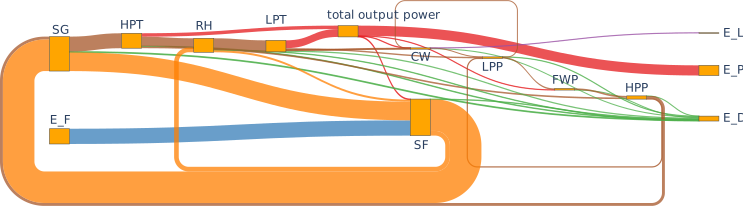
Automatic provision of input data for the sankey diagram class of the plotly library to generate exergy sankey diagrams. For example, the diagram of the solar thermal power plant presented in the thermodynamic analyses section
(PR #251).
The results of your simulation are much more easy to bulk access: The
tespy.networks.network.Networkclass provides you with a results dictionary containing DataFrames with all data necessary. The keys of the dictionary are:'Connection'the class names of the different components used, e.g.
'Turbine'or'HeatExchanger'the labels of the busses, e.g.
'input power'
The pandas DataFrame provides you with the SI-values for components and busses as well as all fluid property data of the connections in respective specified unit. For example:
mynetwork.results['Connection']
mynetwork.results['Turbine']
(PR #255).
Documentation
An own chapter for the exergy analysis toolbox has been added (PR #251).
Fix some typos in the code of heat pump tutorial (PR #260).
Update component parameter data type specifications according to 0.4.x API in docs and add missing parameters in HeatExchanger classes (PR #260).
Fix broken links to characteristic map functions of class
tespy.components.turbomachinery.compressor.Compressor(PR #263).
Bug Fixes
Other Changes
Add a timestamp for the automatic model documentation feature (PR #248).
Move from travis to GitHub actions (PR #249).
Specified Bus values are now colored in the
tespy.networks.network.Network.print_results()method (PR #255).Remove building figures for characteristics from docs generation (PR #251).
Contributors
Francesco Witte (@fwitte)
v0.4.2 - Fixes for User’s Universe (February, 11, 2021)
API Fixes/Changes
Due to a bug/double structure in the network properties of a model, specification of component or connection parameters when the component or connection instance was accessed via its label within the network, the wrong copy of the instance was accessed when using PyGMO in some cases. The method off accessing components and connections via label has therefore changed in the following way.
Old method:
conn = mynetwork.connections['connection label']
comp = mynetwork.components['component label']
New method:
conn = mynetwork.get_conn('connection label')
comp = mynetwork.get_comp('component label')
To iterate through all components or connections of the network use something like:
for conn in mynetwork.conns['object']:
    print(conn.label)

for comp in mynetwork.comps['object']:
    print(comp.label)
Accessing busses remains untouched (PR #247)
Bug Fixes
Saving data of characteristics and reloading from the .csv file structure was broken if more than one component of the same class was part of the network (PR #246).
Contributors
Francesco Witte (@fwitte)
v0.4.1 - User’s Universe (February, 7, 2021)
New Features
Add functionalities for user defined equations. The user can define individual functions that can be applied on connection parameters. E.g. in order to couple mass flow values at some point of the network to temperature values at a different point. Generic equations can be applied: There are no restrictions as long as the partial derivatives are provided correctly. For extensive examples have a look at the API documentation of class
tespy.tools.helpers.UserDefinedEquationor in the respective section in the online documentation (PR #245).
Documentation
Bug Fixes
Fix RuntimeError in CombustionChamberStoich class (PR #244).
Other Changes
Contributors
Francesco Witte (@fwitte)
v0.4.0 - Gibbs’ Gallery (January, 27, 2021)
API Changes
In order to stick closer to the PEP 8 style guide we changed the names of all classes in TESPy to
CamelCaseinstead ofsnake_caseas the latter is reserved for methods. This means, you need to change your import like in the following examples:from tespy.components import Turbine, CombustionEngine from tespy.components import HeatExchanger, HeatExchangerSimple from tespy.connections import Connection from tespy.connections import Bus from tespy.connections import Ref from tespy.networks import Network from tespy.tools.characteristics import CharLine # but keep e.g. from tespy.networks import load_network
The examples in the online documentation and the examples repository have been adjusted accordingly (PR #237).
The definition of power and heat transfer of the components
tespy.components.combustion.engine.CombustionEngineandtespy.components.customs.orc_evaporator.ORCEvaporatoras well as the heat loss values of the componentstespy.components.heat_exchangers.solar_collector.SolarCollectorandtespy.components.heat_exchangers.parabolic_trough.ParabolicTroughhave been changed to negative sign as all values are energy output streams (PR #215) and (PR #243).Specification of characteristics has changed. Use a dictionary instead of DataContainer specification if you want to update more than just the characteristic function. E.g. if you have the measurement data for the isentropic efficiency of a turbine like below. X-data are ratio of actual mass flow to design mass flow and y values are the ratio of actual isentropic efficiency to design value of the turbine. Say, you want to specify these data as
tespy.tools.characteristics.CharLineand the characteristics should be applied. In order to do that, pass a dictionary that contains theCharLineobject as'char_func'and setis_settoTrue:from tespy.components import Turbine from tespy.tools.characteristics import CharLine import numpy as np t = Turbine('myturbine') # ... design specs # ... design calculation # offdesign case, use char line line = CharLine( x=[0.1, 0.3, 0.5, 0.7, 0.9, 1, 1.1], y=np.array([0.6, 0.65, 0.75, 0.82, 0.85, 0.855, 0.79]) / 0.855) t.set_attr(eta_s_char={'char_func': line, 'is_set': True})
More information on characteristics specification and a fully working example can be found in the corresponding section in the online documentation (PR #243).
Characteristic Maps behave differently: Instead of two output dimensions
z1andz2they do now only hold one output dimensionz. The calculation of z as function of x and y does not change (PR #243).The
char_mapparameter of the componenttespy.components.turbomachinery.compressor.Compressorhas been split up into two separate parameters:char_map_eta_s: Map linking non-dimensional mass flow and speed line to isentropic efficiency.char_map_pr: Map linking non-dimensional mass flow and speed line to pressure ratio.
(PR #243).
Remove class Node (PR #243).
For reference specification, the
deltaparameter must be specified in the corresponding network unit, e.g. if your pressure unit is set tobar, thedeltawill be interpreted in bar, too (PR #243).
New Features
Automatic TESPy model documentation: You can generate an automatic model report in LaTeX format after a simulation. The document will contain all input parameters specified as well as all equations and characteristics applied in your previous simulation. Import and function call are implemented as follows. This feature will be under future development, driven by user requirements. If you have any feedback or suggestions or want to add new data you are very welcome to submit an issue in the GitHub repository or even open a pull request. The documentation code is located in the
tespy.tools.document_modelsmodule.from tespy.tools import document_model document_model(mynetwork)
For further information also check the corresponding section in the online documentation (PR #243).
IF97 back end for properties of water is now supported. A fix was implemented in TESPy to solve convergence issues near saturation in region 1. You can use the back end by adding
'IF97::water'to your network’s fluid list (PR #238, also see CoolProp Issue #1918).An automatic exergy analysis has been added. The method reliably works for temperature values that are larger than the ambient temperature. An implementation for temperature values crossing or below the ambient temperature is in the making. Also, combustion processes are not covered for now (PR #215). If you like to contribute, you are welcome to submit an issue in the GitHub repository.
Add a method
get_plotting_datato each component to export the input data required by FluProDia in order to generate the data required to display state changes in the components in a fluid property diagram. Each component returns a nested dictionary containing the respective data. E.g. the return value of avalve:{1: { 'isoline_property': 'h', 'isoline_value': 773.8970004397456, 'isoline_value_end': 773.8970004397456, 'starting_point_property': 'p', 'starting_point_value': 51.164150405253665, 'ending_point_property': 'p', 'ending_point_value': 6.831002318100345 }}
The diagrams could look like this:
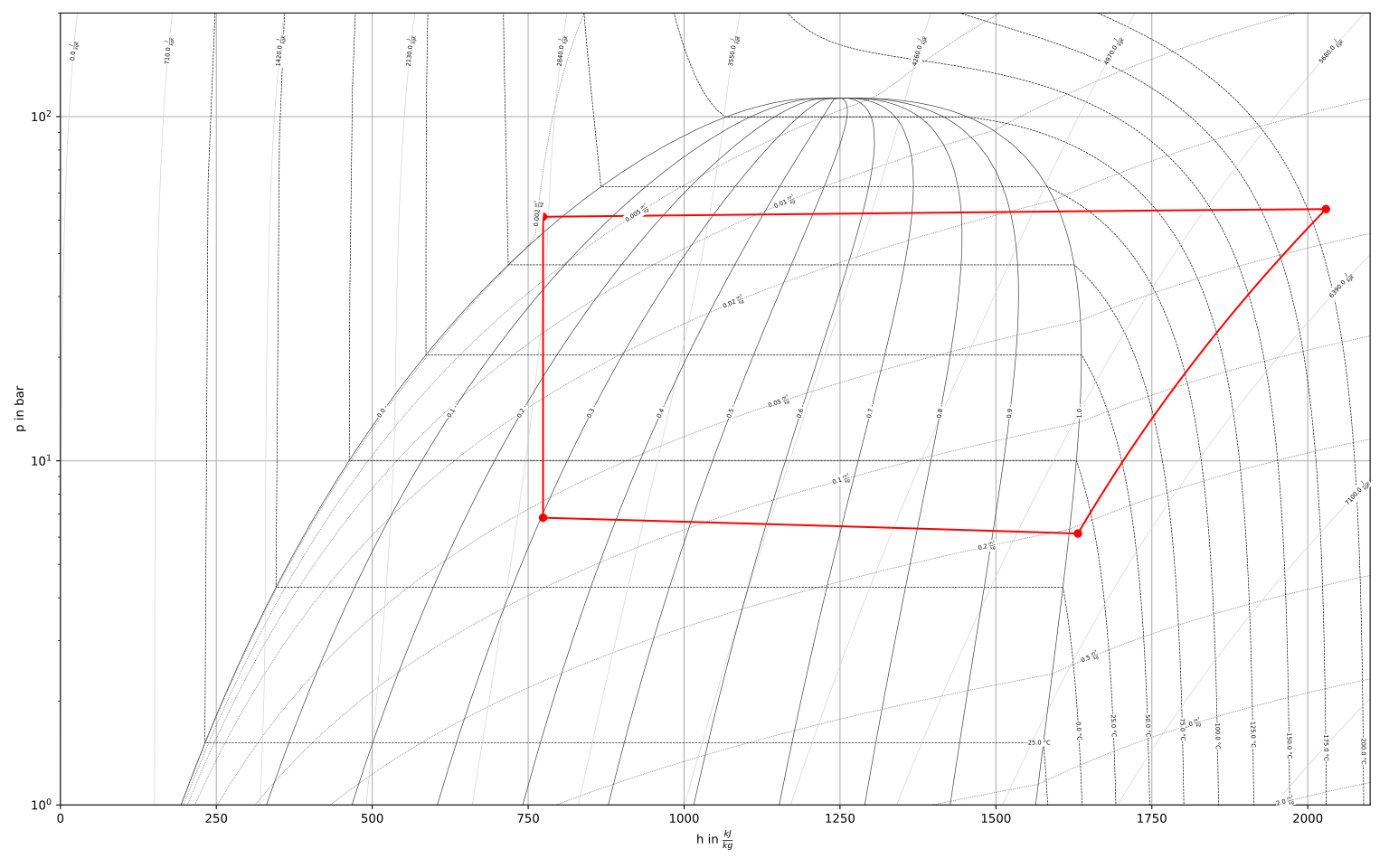
Figure: logph diagram of NH3 with a simple heat pump cycle.
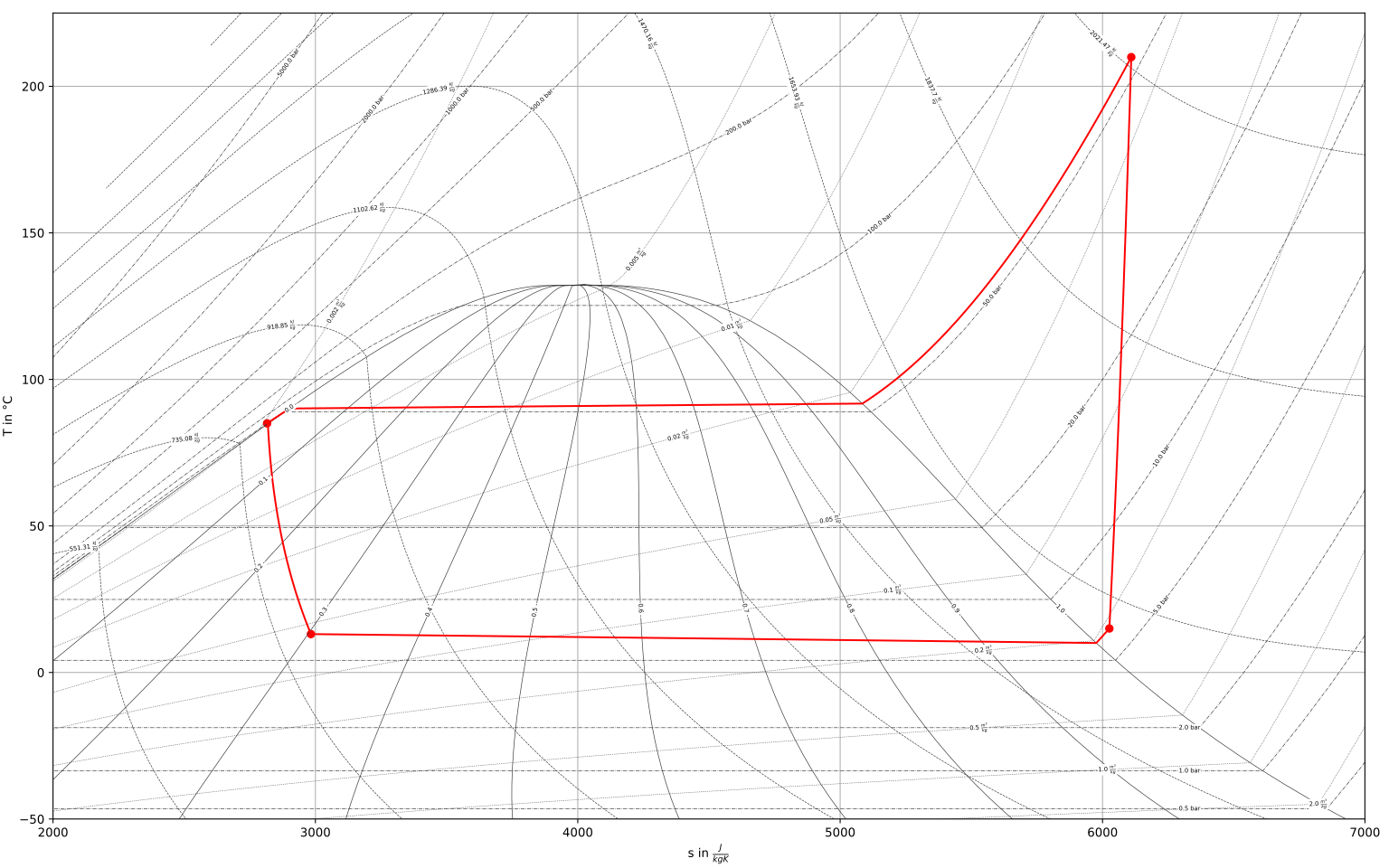
Figure: Ts diagram of NH3 with a simple heat pump cycle.
For more information see the respective documentation section (PR #234).
Add a flag to deactivate calculation of all component equations in every iteration. This improves stability in some cases but may reduce calculation speed (PR #226). To deactivate simply specify on calling the
tespy.networks.network.Network.solve()method:mynetwork.solve('design', always_all_equations=False)
Add a flag use cuda instead of numpy for matrix inversion. With cuda matrix inversion is outsourced to the graphics card. Using cuda additionally requires
cupyinstalled on your machine (PR #226). To activate simply specify on calling thetespy.networks.network.Network.solve()method:mynetwork.solve('design', use_cuda=True)
For more information on
cupyvisit the online documentation.Note
In general, calculation time depends on many factors of your local machine. You should try and check, if using cuda or disabling always all equations benefits your calculation times individually.
Documentation
Fix several broken links and typos (PR #236).
Bug Fixes
Other Changes
component |
parameter |
new value |
|---|---|---|
heat_exchanger_simple |
|
1e15 |
|
200 |
|
valve |
|
1e15 |
On some machines the coloring of the results printout does not work and displaces the table in an ugly way. To avoid this, the coloring is changed to optional (PR #229). Use the following line for non-colored printouts:
mynetwork.print_results(colored=False)
An error message is raised in case the user specifies a fluid vector containing fluids, that are not part of the network’s fluid list (PR #233).
An understandable error message is raised in case the user misses out on fluids required by components of class CombustionChamber or CombustionEngine (#7adff43a).
For improved convergence stability of the methods
tespy.components.heat_exchangers.simple.HeatExchangerSimple.kA_group_funcandtespy.components.heat_exchangers.simple.HeatExchangerSimple.kA_char_group_func, the logarithmic temperature difference is calculated based on the mean temperature difference between ambient and inlet and outlet temperature, if the terminal temperature differences do not have the same sign (PR #225).Changes in the equation management of components for much easier maintenance and future development (PR #243).
Contributors
Francesco Witte (@fwitte)
Markus Brandt (@MarBrandt)
v0.3.4 - Darwin’s Delight (October, 13, 2020)
Documentation
Replace enthalpy starting value with
statekeyword in the heat pump tutorial and the examples from the oemof_examples repository (PR #214, 743bfeb).Add a new tutorial for efficiency optimization of a thermal power plant using TESPy and PyGMO (PR #220).
Fix some typos in the BibTeX data for the TESPy JOSS paper (PR #220).
Bug Fixes
Update the dictionary of busses, components and connections before every calculation. If a parameter is updated by user specification using the dictionary access method and the network object is copied, the dictionaries of the busses, components and connections point to a different object in some cases (d2537ca).
Other Changes
Add network check at the end of
tespy.networks.network_reader.load_networkfunction (PR #212).
Contributors
Francesco Witte (@fwitte)
Markus Brandt (@MarBrandt)
v0.3.3 - Maxwell’s Memory (July, 21, 2020)
New Features
In some cases - especially large networks and many simulation runs within a a single script - the fluid property memorisation added a lot of calculation time for searching through the lookup tables of previously calculated fluid property values. It is now possible to manually specify whether or not the fluid property memorisation is performed.
The memorisation benefits
networks using gaseous mixtures and
smaller networks using the HEOS back end.
The memorisation slows down
very large networks and
usage of tabular back ends (BICUBIC or TTSE).
In order to deactivate memorisation, add
memorise_fluid_properties=Falseon network creation, for example:from tespy.networks import network mynetwork = network( fluids=['BICUBIC::water'], memorise_fluid_properties=False)
(PR #211).
Other Changes
Reorder network initialisation process for improved maintenance and faster performance (PR #204).
Contributors
Francesco Witte (@fwitte)
v0.3.2 - Carnot’s Colors (June, 10, 2020)
New features
Colored printouts are available in the
print_results()method of the network class. There are three different color codes available with default settings:user specified parameters (
'set', blue)component parameters specified as variables (
'var', green)faulty parameters (
'err', red)
In order to change the colors, simply import
coloringfrom thetespy.tools.global_varsmodule and adjust the escape codes. For example, to reset all colors to white text:from tespy.tools.global_vars import coloring coloring['set'] = '\033[0m' coloring['err'] = '\033[0m' coloring['var'] = '\033[0m'
Bug fixes
Readd method for
T_mix_pscalculation for pure fluids: In case the fluid propagation did not go through (e.g. due to availability of good starting values) the fluid composition at a turbomachine’s inlet and outlet may not be equal (PR #207).Fix the calculation of mixture density: The density is calculated as sum of the densities of the mixture components at their respective partial pressure and the mixture temperature (PR #207). With the old method, the specific volume was calculated according to Amagat’s law, which produced incorrect values if one or more components of the mixture were liquid at the mixture’s temperature and pressure. See discussion about humid air propreties here: Issue #206.
Contributors
v0.3.1 - Fix for Mayer’s Merit (May, 29, 2020)
Bug fixes
Remove a debugging printout in the kA_func of the
tespy.components.heat_exchangers.simpleclass.
Contributors
Francesco Witte (@fwitte)
v0.3.0 - Mayer’s Merit (May, 21, 2020)
TESPy version 0.3.0 - Mayer’s Merit comes with a lot of new features and a publication in the Journal of Open Source Software. The paper is available at the website of the JOSS.
BibTeX citation:
@article{Witte2020,
    doi = {10.21105/joss.02178}
    year = {2020},
    publisher = {The Open Journal},
    volume = {5},
    number = {49},
    pages = {2178},
    author = {Francesco Witte and Ilja Tuschy},
    title = {{TESPy}: {T}hermal {E}ngineering {S}ystems in {P}ython},
    journal = {Journal of Open Source Software}
}
New Features
Make entropy
myconn.s.valormyconn.s.val_SIand specific volumemyconn.vol.valormyconn.vol.val_SIrespectively available after simulation (PR #172).Connections, components and busses are now easily accessible on every network. Connections now have a label, which can be specified individually, the default value of the label is given by the following logic.
source:source_id_target:target_id, where source and target are the labels of the connected components.Access the objects with:
mynetwork.busses[‘mybuslabel’]
mynetwork.components[‘mycomponentlabel’]
mynetwork.connections[‘myconnectionlabel’]
(PR #173)
Specification of the CoolProp back end is now possible. You can specify the back end by adding it in front of the fluid’s name on creating a network, for example:
from tespy.networks import network
fluid_list = ['air', 'BICUBIC::water', 'INCOMP::DowQ']
network(fluids=fluid_list)
If you do not specify a back end
HEOSwill be applied (as forairin this example). This has been the case until now as well, thus no further changes are required to match an 0.2.x application to the 0.3.x API. For all back ends available please refer to the fluid properties section. To specify the fluid vector on a connection leave out the back end specification, e.g.:myconnection.set_attr(fluid={'DowQ': 1, 'water': 0, 'air': 0})
(PR #174).
Unsetting a value is now also possible using
Noneinstead ofnp.nan(PR #178).It is possible to choose a base for your components when adding them to a bus:
'component': This means, the efficiency definition of the bus is\[\eta=\frac{\dot{E}_\mathrm{bus}}{\dot{E}_\mathrm{component}}\]'bus': This means, the efficiency definition of the bus is\[\eta=\frac{\dot{E}_\mathrm{component}}{\dot{E}_\mathrm{bus}}\]
These definitions also apply to the characteristic line usage. The default setting (if you do not specify the base) uses
'base': 'component'. You therefore do not need do adapt your scripts regarding this change. For an example of the bus usage see the examples section below (PR #157).Within the busses’ printouts the efficiency of every component on the respective bus is displayed. Additionally, it is possible to get the bus value and the efficiency of a specific component on a specific bus.
to get the bus value use
mycomp.calc_bus_value(mybus)andto get the efficiency use
mycomp.calc_bus_efficiency(mybus)
where
mycompis a component object andmybusis a bus the component has been added to (PR #157).New component
tespy.components.nodes.droplet_separatorfor separation of a single fluid in two phase state into saturated gas and saturated liquid phase. An example is given in the docstrings of the class documentation (PR #186).New component
tespy.components.heat_exchangers.parabolic_troughfor concentrated solar power simulation. An example is given in the docstrings of the class documentation (PR #191).New property
min_iterof thetespy.networks.networks.networkclass, allowing to specify the minimum amount of iterations before a solution is accepted (PR #197).
Documentation
Documentation has been updated according to the API-changes.
Fixed many typos on the online-documentation.
Parameter renaming
Adding components to a bus now requires
'comp'instead of'c'and'param'instead of'p'(PR #157).The former parameter
kAhas been renamed tokA_charas the behavior in offdesign was following a characteristic instead of a constant value. Additionally a new parameterkAhas been implemented, which represents a specified constant value forkAin both design and offdesign cases (PR #199).
Testing
Move from nose to pytest (PR #165).
Add fluid property test for a mixture of a tespy_fluid with a third fluid and a mixture of the same individual fluids (PR #174).
Add a gasturbine model test for comparison of the stoichiometric combustion chamber with the standard combustion chamber (PR #174).
Add bus tests for efficiency definitions (PR #157).
Add Python 3.8, PEP and documentation build tests (PR #201).
Bug fixes
Increase the number of support points for tespy_fluid tabular data creation in order to lift accuracy to a more acceptable value (PR #174).
Fix the default characteristic line for compressor isentropic efficiency: The line did not have an intersection with the point 1/1 (PR #196).
If a temperature value of a mixture was not found within the maximum number of newton iterations in the
tespy.tools.fluid_propertiesmodule, the wrong value was still displayed in the output without a warning. In this case, the value will benanin the future and a warning message is displayed (PR #200).
Other changes
Improve naming in networks, components and connections modules (PR #172, PR #175).
The Parameter
T_rangeof networks is deprecated. The fluid property calls for mixtures have been modified to prevent errors when the temperature of the mixture is below the minimum or above the maximum temperature limit of a component of the mixture (PR #200).Restructure package skeleton (PR #201).
Changes in the API
The changes affect
reading design point information from the
design_pathreading starting value information from the
init_pathand loading networks with the network reader’s
tespy.networks.network_reader.load_networkmethod.
Data generated in older versions of TESPy can not be imported. In order to fix this follow the steps below.
rename the
compsfolder tocomponentsrename the
conns.csvfile toconnections.csv
and within the file rename the columns
stosources_idtosource_idttotargett_idtotarget_id
If you want to use the network reader,
create a
network.jsonfile.add the desired contents as listed below.
The fluids are represented in a dictionary containing the fluid’s names as keys
and the CoolProp back end as value. "HEOS" is the default back end,
which has been used until version 0.2.x in TESPy.
{
    "fluids":
    {
        "CO2": "TTSE",
        "O2": "HEOS",
        "N2": "BICUBIC",
    },
    "T_unit": "C",
    "h_unit": "kJ / kg",
    "m_unit": "kg / s",
    "h_range": [150, 3000]
}
If you are having trouble applying these changes, you are welcome to open an issue on our github repository.
Example
We have added a code example below to underline the changes regarding the bus
usage. Simply, a pump is connected to a source and a sink. The pump’s
efficiency and pressure rise are defined. We define three different busses
and add the pump to these busses with a given efficiency value of 0.95.
from tespy.components import pump, sink, source
from tespy.connections import bus, connection
from tespy.networks import network

nw = network(fluids=['H2O'], p_unit='bar', T_unit='C')

si = sink('sink')
so = source('source')
pu = pump('pump')

so_pu = connection(so, 'out1', pu, 'in1')
pu_si = connection(pu, 'out1', si, 'in1')

nw.add_conns(so_pu, pu_si)

bus1 = bus('bus 1')
bus1.add_comps({'comp': pu, 'char': 0.95, 'base': 'bus'})

# this yields a bus value smaller than the component value!!
bus2 = bus('bus 2')
bus2.add_comps({'comp': pu, 'char': 0.95, 'base': 'component'})

bus3 = bus('bus 3')
bus3.add_comps({'comp': pu, 'char': 1 / 0.95, 'base': 'component'})

nw.add_busses(bus1, bus2, bus3)

so_pu.set_attr(fluid={'H2O': 1}, m=10, p=5, T=20)
pu_si.set_attr(p=10)

pu.set_attr(eta_s=0.75)

nw.solve('design')
nw.print_results()
As you can see, the components value of the bus will always be the same. Due to the efficiency definitions as mentioned in the new features, the bus value of bus3 and bus1 are identical. bus3 implements the method applied so far (in case of a motor at least) and bus1 implements the new efficiency definition based on the bus value. For bus2 the efficiency definition is based on the component, thus the bus value is lower than the component value (which would be great in case of a motor, but unfortunately some thermodynamic experts may have issues with that…).
Contributors
Francesco Witte (@fwitte)
v0.2.2 - Rankine’s Realm (March, 6, 2020)
New Features
Allow initialisation for the primary variables from previous calculation. Until now, the user needed to save the network’s state and reload that state for his next simulation. This feature is enabled as default. If you want to disable this feature, you need to state
mynetwork.solve(..., init_previous=False)(PR #156).Extrapolation for characteristic lines is available. In default state, the upper or lower value range limit is used when a characteristic line is evaluated outside of the available x-value range. The
extrapolateparameter allows linear extrapolation, for an example see the corresponding sections in the online documentation: component characteristics, tespy characteristics (PR #159).Add a new component evaporator for geothermal organic rankine cycle. The component has inlets for geothermal steam brine. On the cold side, the orc working fluid is evaporated. Read more about this component in the API documentation:
tespy.components.customs.orc_evaporator(PR #148).
Documentation
Add method for automatic citations and references (PR #163).
Parameter renaming
Testing
Bug fixes
Fix the bugged tests for compressor characteristic maps (
tespy.components.turbomachinery.compressor.char_map_func). The pressure ratio factor of the lowest speedline available in the default data ranges from about 0.2 to 0.5. Therefore the design pressure ratio should be higher than 5 (PR #156).
Other changes
Contributors
Francesco Witte (@fwitte)
v0.2.1 - Fourier’s Fable (February, 7 2020)
New Features
Back end modifications in order to improve calculation speed. For the results see (PR #147).
Documentation
Parameter renaming
Testing
Improve the heat pump test (PR #150).
Bug fixes
Prevent pandas 1.0.0 installation due to bug in the
to_csv()method (bug will be fixed in PR #31513 of pandas). Additionally,the version requirements of third party packages have been updated to prevent future bugs resulting from possible API changes (PR #146).There was a bug in the heat exchanger kA-functions (
tespy.components.heat_exchangers.simple.kA_func,tespy.components.heat_exchangers.base.kA_funcandtespy.components.heat_exchangers.condenser.kA_func). The factors for the heat transfer coefficient should not simultaneously amplify the value but instead with their inverse.\[f_{kA} = \frac{2}{\frac{1}{f_{kA,1}} + \frac{1}{f_{kA,2}}}\]For simple heat exchangers, \(f_{kA,2}\) will be equal to 1 (PR #150).
Other changes
Replacing some of the characteristic lines by generic ones. The simulation results using the default lines might slightly differ from the results using the original defaults (PR #149).
Contributors
Francesco Witte (@fwitte)
@maltefritz
v0.2.0 - Clausius’ Circus (January, 15, 2020)
TESPy Clausius’ Circus includes many back end adjustments for future development. Additionally, some new features have been implemented improving the usage of the software. Due to changes in the API, version 0.2.0 will not be compatible with older versions of TESPy!
New Features
Implemented a new component “cycle_closer”. This component may serve as substitute for a sink/source or splitter/merge combination in closed cycle simulations (PR #107).
Added optical efficiency to the “solar_collector”. The incoming radiation E no longer represents the actual absorption but the radiation on the collector surface area (PR #110).
Parameters
local_designandlocal_offdesignare now also available for network exports and imports (PR #109).Busses, components and connections are now equipped with
printoutattribute. For example, if you specifymyconn.set_attr(printout=False)the results of the specified connection will not be printed by theprint_resultsmethod of your network. This is especially useful, if you have a large network and only want to print the results at the most important points (PR #126).It is possible to place custom characteristic lines and maps in the
HOME/.tespy/datafolder and import these for your TESPy scripts. Have a look at the documentation for more information (PR #118).If the network check fails due to component inlets or outlets being connected to more than one connection at a time, all connections are printed for easier network topology debugging (PR #135).
Documentation
Full review of online documentation (PR #112).
Full review of the examples repository (PR #46 of oemof_examples).
Plots of default characteristic lines and maps are generated automatically on documentation build (PR #139).
Parameter renaming
New name for cogeneration_unit: combustion_engine (PR #105).
New name for subsys_interface: subsystem_interface (PR #107).
The module import shortcuts (
from tespy import ...) for components (cmp), connections (con), helpers (hlp), logger (logger), networks (nwk), network_reader (nwkr) are no longer supported (PR #108)! We instead implemented new shortcuts instead for tespy.networks and tespy.components modules (PR #118).The method
set_printoptionsfor thetespy.networks.networks.networkclass is not available anymore. Useyournetwork.set_attr(iterinfo=True/False)in future (PR #109).Parameter
interfacefor sinks and sources has been removed (PR #109).The method for loading networks from the network_reader module has been renamed from
load_nwktoload_network(PR #118).
Testing
Bug fixes
Bus value specification uses
is_setinstead ofval_setas the component properties data container is used (39ca830).Parameters
local_designandlocal_offdesignare now also available for network exports and imports (PR #109).Busses and characteristics are not exported, if none are used in the network. The network_reader can now handle missing bus.csv, char_line.csv and char_map.csv (PR #127).
Some parameters of class
combustion_engine <tespy.components.combustion.engine>have been printed out twice in the value range check (PR #135).
Other changes
Adjust logging levels for grouped component parameter initialisation (PR #111).
Implement pep8speaks (PEP8 checker) in GitHub repository (PR #131).
The subsystem architecture has been simplified. Your connections and components are saved to dictionaries to make accessing the individual properties much easier (PR #126). For a use case of subsystems, have a look at the district heating example.
Change the specification of set value for
dc_simple <tespy.tools.data_containers.dc_simple>class fromval_settois_set(PR #138).Move the default characteristic function plots to the tespy.data module documentation (PR #138).
Contributors
Francesco Witte (@fwitte)
@MarBrandt
@maltefritz
@jfreissmann
@stianchris
@FranziPl
Examples
Removed default import shortcuts
tespy 0.1.x
from tespy import cmp, cmp_char, con, hlp, logger, nwk, nwkr, subsys
tespy 0.2.x (example imports)
from tespy.components import heat_exchanger, turbine
from tespy.connections import connection, bus, ref
from tespy.networks import network, load_network
from tespy.tools import char_line, char_map
from tespy.tools import logger
Renaming components
tespy 0.1.x
from tespy import cmp
chp = cmp.cogeneration_unit('combined heat and power')
IF = cmp.subsys_interface('subsystem interface')
tespy 0.2.x
from tespy.components import combustion_engine, subsystem_interface
chp = combustion_engine('combined heat and power')
IF = subsystem_interface('subsystem interface')
Renaming tespy.networks functionalities
tespy 0.1.x
from tespy import nwkr
mynetwork = nwkr.load_nwk('path/to/exported/networkfiles')
mynetwork.set_printoptions(print_level='none')
mynetwork.set_printoptions(print_level='info')
tespy 0.2.x
from tespy.networks import load_network
mynetwork = load_network('path/to/exported/networkfiles')
mynetwork.set_attr(iterinfo=False)
mynetwork.set_attr(iterinfo=True)
Component characteristic specification
tespy 0.1.x
from tespy import cmp, hlp
turb = cmp.turbine('turbine')
x = [0.50, 0.75, 1.00, 1.25]
y = [0.90, 0.98, 1.00, 0.99]
char = hlp.dc_cc(is_set=True, x=x, y=y)
turb.set_attr(eta_s_char=char)
tespy 0.2.x
from tespy.components import turbine
from tespy.tools import char_line
turb = turbine('turbine')
x = [0.50, 0.75, 1.00, 1.25]
y = [0.90, 0.98, 1.00, 0.99]
char = dc_cc(is_set=True, func=char_line(x, y))
turb.set_attr(eta_s_char=char)
v0.1.4 (December, 12, 2019)
New Features
Implemented difference pressure vs mass flow characteristic line for valve (c4eec6d).
Documentation
Fix typos in docstrings in components module (PR #102).
Parameter renaming
Testing
Bug fixes
Other changes
This is the last release before version 0.2.0.
Contributors
Francesco Witte
v0.1.3 (November, 6, 2019)
New Features
Individual design path specification is available: Specify the design_path individually for single connections or a components in your network, if you want the individual design parameters be loaded from a different design case than the network’s design case given in the network’s design path (PR #84).
Implement local design and local offdesign features: It is possible to design a plant while some parts of the plant are in offdesign mode. This is useful, e.g. when designing an extraction turbine, where the district heating condenser is designed for maximum extraction and the backpressure turbine is designed for minimum extraction (PR #92).
Implement warning messages for all components, if the component’s properties are out of physical bounds. The bounds can be customized when specifying a property by data containers (read more at component parameter specification), (PR #85).
Documentation
Parameter renaming
Testing
Bug fixes
Offdesign values for connections are specified from the design case files (PR #84). Before, the offdesign values were the actual values of the fluid property in the last calculation (which is not necessarily the design case).
Add debug logging message, if the enthalpy is adjusted on connections with the keyword
statespecified (PR #85).
Other changes
Improved calculation speed for fluid mixture properties with the parameter T0 as starting value for root finding (PR #84).
Contributors
Francesco Witte
v0.1.2 (August, 6, 2019)
New Features
The water electrolyzer is available as new component of TESPy (PR #73).
The components
combustion chamber <tespy.components.components.base>andcogeneration unit <tespy.components.components.cogeneration_unit>now work with fuel mixtures, too. Specification of the component’s fuel is not required anymore, the software automatically detects, which fuels are connected to the component’s inlets. Available fuels are: methane, ethane, propane, butane and hydrogen (PR #79).Add busses to the
network's result printout <tespy.networks.network.print_results>.
Documentation
Parameter renaming
Testing
Bug fixes
Fix convergence check for negative minimum enthalpy values (PR #71).
Add an error message if the user did not add any connections to the network (PR #79).
Fix loading bus information from design-case .csv-file. Components can be attached to multiple busses now (PR #79).
Fix solar collector energy balance equation and adjust documentation (PR #83).
Other changes
Water Electrolyzer Example
from tespy import cmp, con, nwk

fluid_list = ['O2', 'H2O', 'H2']
nw = nwk.network(fluids=fluid_list, T_unit='C', p_unit='bar')

# sinks and sources
fw = cmp.source('feed water')
oxy = cmp.sink('oxygen sink')
hydro = cmp.sink('hydrogen sink')
cw = cmp.source('cooling water')
cw_hot = cmp.sink('cooling water out')

# specification of electrolysis efficiency
el = cmp.water_electrolyzer('electrolyzer 1', eta=0.8, design=['eta'], offdesign=['eta_char'])

# hydrogen compression
comp = cmp.compressor('compressor', eta_s=0.9)

# specify the feed water mass flow
# the fluid composition at the feed water inlet and the oxygen as well as
# hydrogen outlets are not required. These parameters are set automatically.
fw_el = con.connection(fw, 'out1', el, 'in2', m=0.1, p=10, T=15)
el_o = con.connection(el, 'out2', oxy, 'in1')
el_cmp = con.connection(el, 'out3', comp, 'in1', T=50)
cmp_h = con.connection(comp, 'out1', hydro, 'in1', p=50)

# cooling water specifications
cw_el = con.connection(cw, 'out1', el, 'in1', fluid={'H2O': 1, 'H2': 0, 'O2': 0}, p=5, T=15)
el_cw = con.connection(el, 'out1', cw_hot, 'in1', T=45, p=4.9)
nw.add_conns(fw_el, el_o, el_cmp, cmp_h, cw_el, el_cw)

# solve design case
nw.solve('design')
nw.save('tmp')
# test offdesign case
nw.solve('offdesign', design_path='tmp')

# change feed water flow and recalculate operation
fw_el.set_attr(m=0.05)
nw.solve('offdesign', design_path='tmp')
Contributors
Francesco Witte
Tim Hoener, Nils Stolze, Markus Brandt
v0.1.1 (May, 14, 2019)
New Features
Specifcation of temperature below or above boiling point temperature with
Td_bpkeyword on connections (PR #64).Path specifications for the
init_pathanddesign_pathin the networks module as well aspathin the network_reader module now work with relative and absolute paths. The feature has been tested on windows and linux machines (PR #66).
Documentation
Updated “Using TESPy” according to the new features, you can find an Example for the usage of the
Td_bpand thestatekeyword at the bottom of this release message.
Parameter renaming
Testing
Tests and doctests have been adjusted and updated to test the new features.
Added software tests for OS X (PR #68), windows tests to follow.
Bug fixes
Other changes
Modified printouts of connection properties for
network.print_results()-function (668ca6)Changed access to imported network’s connections (
mynetwork.imp_conns['{source}:{source id}_{target}:{target id}'], replace{...}by the respectve component or id). (a5a867).Improved convergence stability for temperatures specified near to the two phase area using the keyowrd
state='l'(for liquid) orstate='g'(for gaseous). The convergence check manipulates the enthalpy values at this connection in order to meet the phase specification (PR #64).
Example
from tespy import cmp, con, nwk
import numpy as np

# network
fluid_list = ['NH3', 'water']
nw = nwk.network(fluids=fluid_list, T_unit='C', p_unit='bar', h_unit='kJ / kg')

# components
tesin = cmp.sink('TES in')
tesout = cmp.source('TES out')
hsin = cmp.sink('HS in')
hsout = cmp.source('HS out')
he = cmp.heat_exchanger('heat exchanger')

# connection
tes_he = con.connection(tesout, 'out1', he, 'in2')
he_tes = con.connection(he, 'out2', tesin, 'in1')
hs_he = con.connection(hsout, 'out1', he, 'in1')
he_hs = con.connection(he, 'out1', hsin, 'in1')
nw.add_conns(tes_he, he_tes, hs_he, he_hs)

# heat exchanger parameters
he.set_attr(pr1=0.98, pr2=0.98, ttd_u=42, Q=-90e3)

# hot side parameters
hs_he.set_attr(T=70, p=9.4, fluid={'NH3': 1, 'water': 0})
he_hs.set_attr(T=35)

# cold side inlet
tes_he.set_attr(T=18, p=5, fluid={'NH3': 0, 'water': 1})

# solve
nw.solve('design')

fill = '############################################################'

print(fill)
print('See, the calculation did not work: The temperature value for the '
          'hot side outlet is near to the two phase region. A singularity '
          'appears in the solution process, as the temperature equation\'s '
          'derivative towards enthalpy will be zero in this region.')
print(fill)

## let's retry with state keyword (state should be gaseous)
he_hs.set_attr(state='g')

nw.solve('design')
nw.print_results()

print(fill)
print('The state keyword prevents the fluids state at the hot side outlet '
          'from going into two phase region, a solution is found.')
print(fill)

# so how does the superheating or subcooling work?
# remove state and temperature specification, add superheating specification
# temperature difference to boiling point = 10 K
he_hs.set_attr(state=np.nan, T=np.nan, Td_bp=10)
nw.solve('design')
nw.print_results()

print(fill)
print('The temperature at hot side outlet is 10 K above the (prior) unkown '
          'boiling point temperature at that point.')
print(fill)
Contributors
Francesco Witte
Shuang Chen
v0.1.0 (February, 2, 2019)
New Features
Added new component node and modified equations for simple heat exchangers to work with negative mass flows. The node component is able to switch between merge and splitter equations according to the directions of the mass flows. Please beware, that the amount of the equations of a splitter and a merge is not the same, thus the number of equations provided by the node depend on the flow direction and may change within the calculation process. In order to make use of the node, a network should always contain more than one node, so that a different node can compensate a possible change in flow direction (PR #43).
Added examples for components, busses, connections etc. in the docstrings. You will find the examples in either your editors help pane or the online documentation of the API (PR #45).
Added an interface attribute for sinks and sources changing the component type from sink/source to subsys_interface when exporting the network, if you specify
interface=Truefor these type of components. This way, you can reimport the saved network and connect it to a different network. Also imported components, connections and busses are easily accessible by their label (components/busses) or their target with target id (connections). For an example, see the module documentationtespy.network_reader. (PR #46).Added logging (console and log-file), see how to use it (PR #51).
Documentation
Adapted documentation and examples in regard of new features. Examples have been moved to the oemof-examples repository.
Improved consistency in documentation of all modules (PR #45).
Registered a DOI for TESPy version 0.1.0.

Parameter renaming
networks
init_file -> init_path
design_file -> design_path
structure -> deprecated: Providing
structure=Trueon saving the network is not required anymore, the network structure is exported automatically.
Note
The initialisation method and handling of design and offdesign calculations has been adjusted. In future, please specify the path to the folder, where your results have been saved, e.g.:
mynetwork.save('path/to/folder')
mynetwork.solve('offdesign', design_path='path/to/folder', init_path='path/to/folder')
Testing
The examples in the docstrings are used as doctests.
Component tests have been implemented.
General tests for errors, printouts and fluid properties have been implemented.
Benchmark test for a heat pump model (still to be improved, see inline comments).
Testcoverage will be checked for every PR in the future!
See PR #52.
Bug fixes
Adjusted network export and network import to work for grouped component properties and characteristic maps (PR #46).
Redesigned pre- and postprocessing of component properties as some errors occoured before. Design parameters are now always gathered from the component .csv-file containing the design point information (saved design state of the network) (PR #50).
Other changes
Improved calculation speed by swapping the CoolProp.CoolProp.PropsSI-calls with CoolProp.AbstractState calls (PR #49).
Contributors
Francesco Witte
v0.0.5 (October, 25, 2018)
New Features
added new component: motoric cogeneration unit (79a1177). An example is provided here.
improved fluid property checks (8adc76c).
added bus characteristics for modeling variable efficiencys (e.g. for generator, motor, boiler) (79a1177).
isentropic efficiency characteristic for compressor linked to pressure ratio (85d317d).
added volumetric flow specification (63db64d).
Documentation
adapted documentation and (example code) in regard of new features.
fixed some typos in documentation.
Parameter renaming
compressor - vigv -> igva (inlet guide vane angle)
simple heat exchanger - t_a -> Tamb (ambient temperature)
solar collector - t_a -> Tamb (ambient temperature)
Testing
Bug fixes
Other changes
remodeled the characteristic map for compressors: if not specified, igva is assumed to be 0° (2425a77).
redesigned the printouts for component parameters (9465be6, b2c0897, cbbc1a1, 1e55e36, 2e795c2)
- custom variables are available for (977a5be):
turbomachines,
vessels,
simple heat exchangers (as well as pipes and solar collctors) and
cogeneration unit.
Contributors
Francesco Witte
Paul Hansen
v0.0.4 (September, 2018)
New Features
Documentation
improved the online-documentation with new structure and new examples (fa5e7ca, 6ef4d99). You will find the new examples in this section.
fixed some typos in different modules and the online-documentation
Testing
Bug fixes
Other changes
Contributors
Francesco Witte
v0.0.3 (July 05, 2018)
New Features
added new component: stoichiometric combustion chamber (0989493, 1e84386, 460dd9f, 6d10d2d).
added custom fluid databases, mainly for usage in stoichiometric combustion chamber (45e19ae, c3da785, 7cb1144).
added val_SI-attribute to datacontainers for setting ambient temperatures at simple heat exchangers (c4ba349, 3c7d94e).
added entropy balance for components (5944eae, b0aed98, e0839ab).
added pressure rise vs. flow rate characteristics for component pump (e79a191, e3409bf, 8fe6976).
added hazen-williams equation for pipe pressure loss calculation (bf0b865, 25c32bc, cee8cee).
added TESPy network import/export (7fefc59, 70ae908, 13ef1ad, 40e906c).
added data container for grouped component properties (83c9ff4).
Documentation
Testing
Bug fixes
convergence stability improvements for combustion chamber, fixes in the equations and derivatives (2c396f0, 59e3879, 10b2887).
fixes/improvements for the convergence control (6e8ea60, 43e8ee1).
fixed vapour quality specification (ec3865d).
added missing get_attr method for class characteristics (13cf730).
Other changes
Contributors
Francesco Witte
Shuang Chen
Thanks to Shuang and Haibing from the UFZ for implementing the hazen-williams equation!
v0.0.2 (April 07, 2018)
New Features
Changed architecture of the variables and component parameters. Every parameter is now a data container, giving the user more flexibility (e.g. specifiying a unit) and facilitating future development.
Changed architecture of fluid property function calls to make custom fluids or custom fluid property functions available.
Added custom fluid class to generate fluid properties from given fluid mixture.
Added generic component characteristics for turbine isentropic efficiency and cone law as well as for the heat exchangers heat transfer coefficient. On top, the user may use own values for the characteristic lines.
Added val_SI to data container for component properties for future development.
Documentation
Added documentation on how to handle data containers for variables and parameters.
Added an example for combustion chamber usage.
Testing
Bug fixes
Adjusted the generic pump characteristics to cause less instabilities and adjusted function parameters according to KSB.
Fixed bug in combustion chamber’s thermal input equation.
Fixed parameters for numerical calculation of derivatives.
Fixed starting relaxation parameter.
Other changes
Improved convergence stability for combustion chamber and heat exchanger.
Contributors
Francesco Witte
v0.0.1 (March 08, 2018)
First release.
Contributors
Francesco Witte
Thanks to - Paul-Jonas Hansen and - Malte Fritz for adding the tutorial and a lot of testing and trouble-shooting!