tespy.components.basics package
tespy.components.basics.cycle_closer module
Module for class CycleCloser
This file is part of project TESPy (github.com/oemof/tespy). It’s copyrighted by the contributors recorded in the version control history of the file, available from its original location tespy/components/basics/cycle_closer.py
SPDX-License-Identifier: MIT
- class tespy.components.basics.cycle_closer.CycleCloser(label, **kwargs)[source]
Bases:
ComponentComponent for closing cycles.
Mandatory Equations
pressure:
tespy.components.component.Component.variable_equality_structure_matrix()enthalpy:
tespy.components.component.Component.variable_equality_structure_matrix()
Image not available
- Parameters:
label (str) – The label of the component.
design (list) – List containing design parameters (stated as String).
offdesign (list) – List containing offdesign parameters (stated as String).
design_path (str) – Path to the components design case.
local_offdesign (boolean) – Treat this component in offdesign mode in a design calculation.
local_design (boolean) – Treat this component in design mode in an offdesign calculation.
char_warnings (boolean) – Ignore warnings on default characteristics usage for this component.
printout (boolean) – Include this component in the network’s results printout.
Note
This component can be used to close a cycle process. The system of equations describing your plant will overdetermined, if you close a cycle without this component or a cut the cycle with a sink and a source at some point of the cycle. This component can be used instead of cutting the cycle.
Example
Create a cycle containing a pump and a pipe. The pump increases pressure the pipe cools the liquid and destroys the pressure rise. The heat extracted at the pipe must be the same value of the power input at the pump (but negative), as there is no other in- or outputs of energy in the system.
>>> from tespy.components import CycleCloser, Pipe, Pump
>>> from tespy.connections import Connection
>>> from tespy.networks import Network
>>> nw = Network(iterinfo=False)
>>> nw.units.set_defaults(**{
...     "pressure": "bar", "temperature": "degC"
... })
>>> pi = Pipe('pipe')
>>> pu = Pump('pump')
>>> cc = CycleCloser('cycle closing component')
>>> pu_pi = Connection(pu, 'out1', pi, 'in1')
>>> pi_cc = Connection(pi, 'out1', cc, 'in1')
>>> cc_pu = Connection(cc, 'out1', pu, 'in1')
>>> nw.add_conns(pu_pi, pi_cc, cc_pu)
>>> pi_cc.set_attr(p=1, T=20, fluid={'water': 1})
>>> pu_pi.set_attr(p=10)
>>> pu.set_attr(eta_s=0.8, P=1000)
>>> nw.solve('design')
>>> round(pi.Q.val, 1) == -round(pu.P.val, 1)
True
tespy.components.basics.sink module
Module for class Sink.
This file is part of project TESPy (github.com/oemof/tespy). It’s copyrighted by the contributors recorded in the version control history of the file, available from its original location tespy/components/basics/sink.py
SPDX-License-Identifier: MIT
- class tespy.components.basics.sink.Sink(label, **kwargs)[source]
Bases:
ComponentA flow drains in a Sink.
- Parameters:
label (str) – The label of the component.
design (list) – List containing design parameters (stated as String).
offdesign (list) – List containing offdesign parameters (stated as String).
design_path (str) – Path to the components design case.
local_offdesign (boolean) – Treat this component in offdesign mode in a design calculation.
local_design (boolean) – Treat this component in design mode in an offdesign calculation.
char_warnings (boolean) – Ignore warnings on default characteristics usage for this component.
printout (boolean) – Include this component in the network’s results printout.
Example
Create a sink and specify a label.
>>> from tespy.components import Sink
>>> si = Sink('a labeled sink')
>>> si.label
'a labeled sink'
- exergy_balance(T0)[source]
Exergy balance calculation method of a sink.
A sink does not destroy or produce exergy. The value of \(\dot{E}_\mathrm{bus}\) is set to the exergy of the mass flow to make exergy balancing methods more simple as in general a mass flow can be fuel, product or loss.
- Parameters:
T0 (float) – Ambient temperature T0 / K.
Note
\[\dot{E}_\mathrm{bus} = \dot{E}_\mathrm{in}^\mathrm{PH}\]
tespy.components.basics.source module
Module for class Source.
This file is part of project TESPy (github.com/oemof/tespy). It’s copyrighted by the contributors recorded in the version control history of the file, available from its original location tespy/components/basics/source.py
SPDX-License-Identifier: MIT
- class tespy.components.basics.source.Source(label, **kwargs)[source]
Bases:
ComponentA flow originates from a Source.
- Parameters:
label (str) – The label of the component.
design (list) – List containing design parameters (stated as String).
offdesign (list) – List containing offdesign parameters (stated as String).
design_path (str) – Path to the components design case.
local_offdesign (boolean) – Treat this component in offdesign mode in a design calculation.
local_design (boolean) – Treat this component in design mode in an offdesign calculation.
char_warnings (boolean) – Ignore warnings on default characteristics usage for this component.
printout (boolean) – Include this component in the network’s results printout.
Example
Create a source and specify a label.
>>> from tespy.components import Source
>>> so = Source('a labeled source')
>>> so.label
'a labeled source'
- exergy_balance(T0)[source]
Exergy balance calculation method of a source.
A source does not destroy or produce exergy. The value of \(\dot{E}_\mathrm{bus}\) is set to the exergy of the mass flow to make exergy balancing methods more simple as in general a mass flow can be fuel, product or loss.
- Parameters:
T0 (float) – Ambient temperature T0 / K.
Note
\[\dot{E}_\mathrm{bus} = \dot{E}_\mathrm{out}^\mathrm{PH}\]
tespy.components.basics.subsystem_interface module
Module for class SubsystemInterface.
This file is part of project TESPy (github.com/oemof/tespy). It’s copyrighted by the contributors recorded in the version control history of the file, available from its original location tespy/components/basics/subsystem_interface.py
SPDX-License-Identifier: MIT
- class tespy.components.basics.subsystem_interface.SubsystemInterface(label, **kwargs)[source]
Bases:
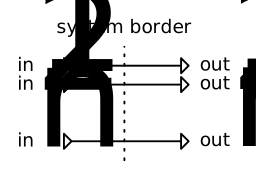
ComponentThe subsystem interface does not change fluid properties.
Mandatory Equations
mass flow:
tespy.components.component.Component.variable_equality_structure_matrix()pressure:
tespy.components.component.Component.variable_equality_structure_matrix()enthalpy:
tespy.components.component.Component.variable_equality_structure_matrix()fluid:
tespy.components.component.Component.variable_equality_structure_matrix()
Inlets/Outlets
Specify number of inlets and outlets with
num_inter, default value: 1.
Image

- Parameters:
label (str) – The label of the component.
design (list) – List containing design parameters (stated as String).
offdesign (list) – List containing offdesign parameters (stated as String).
design_path (str) – Path to the components design case.
local_offdesign (boolean) – Treat this component in offdesign mode in a design calculation.
local_design (boolean) – Treat this component in design mode in an offdesign calculation.
char_warnings (boolean) – Ignore warnings on default characteristics usage for this component.
printout (boolean) – Include this component in the network’s results printout.
num_inter (float, dict) – Number of interfaces for subsystem.
Note
This component passes all fluid properties and mass flow from its inlet to the outlet.
Example
As connections can only connect a component with a different component, the subsystem interface is used to connect subsystems with the rest of your network. It is necessary to specify the number of interfaces of the subsystem interface, if you want any number other than 1. We will not go in depth of subsystem usage in this example. Please refer to this section for more information on building your own subsystems.
>>> from tespy.components import Sink, Source, SubsystemInterface
>>> from tespy.connections import Connection
>>> from tespy.networks import Network
>>> nw = Network(iterinfo=False)
>>> nw.units.set_defaults(**{
...     "pressure": "bar", "temperature": "degC", "enthalpy": "kJ/kg"
... })
>>> so1 = Source('source 1')
>>> si1 = Sink('sink 1')
>>> so2 = Source('source 2')
>>> si2 = Sink('sink 2')
>>> IF = SubsystemInterface('subsystem interface', num_inter=2)
>>> len(IF.inlets())
2
The interface does not change the fluid properties in any way.
>>> inc1 = Connection(so1, 'out1', IF, 'in1')
>>> outg1 = Connection(IF, 'out1', si1, 'in1')
>>> inc2 = Connection(so2, 'out1', IF, 'in2')
>>> outg2 = Connection(IF, 'out2', si2, 'in1')
>>> nw.add_conns(inc1, outg1, inc2, outg2)
>>> inc1.set_attr(fluid={'H2O': 1}, T=40, p=3, m=100)
>>> inc2.set_attr(fluid={'N2': 1}, T=60, p=1)
>>> outg2.set_attr(v=10)
>>> nw.solve('design')
>>> inc1.m.val_SI == outg1.m.val_SI
True
>>> inc2.m.val_SI == outg2.m.val_SI
True
>>> inc1.h.val_SI == outg1.h.val_SI
True
>>> inc2.h.val_SI == outg2.h.val_SI
True